Maliah Classes · Sign-in at the door
Sign-in and sign-out, signed at the door
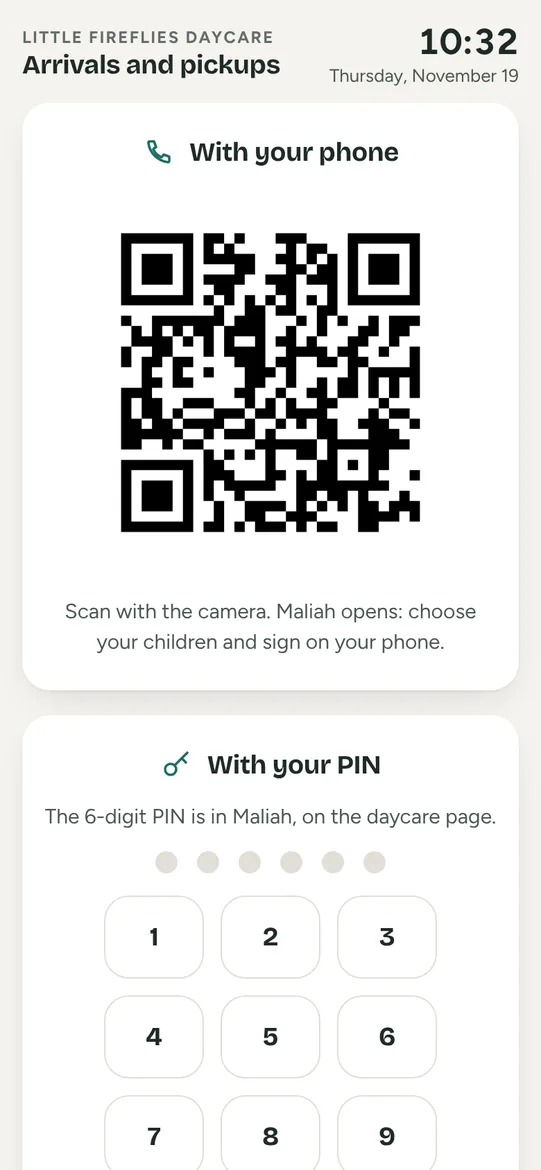
A tablet at the entrance becomes a kiosk. The parent scans the QR code with Maliah or types their PIN, picks their child and signs: the arrival lands in the group and in the day’s report.
Included in the plan, from $19 a month · 30-day free trial See pricing →


- Essentials free forever
- No ads
- Hosted in Canada
- iPhone · Android · tablet · web
- 10 languages
What it does
- A tablet, phone or computer at the entrance shows the kiosk full screen, with a QR code that changes every minute.
- The parent scans the code with the Maliah app or types their 6-digit PIN, picks their child, then signs on the screen.
- Authorized pickup people, like a grandparent, get their own PIN.
- Arrivals and departures land in the group with the time and the person’s name, and go into the day’s report.
- The director reads the door log, signatures included, and prints it.
6 digits
the PIN of each parent or authorized pickup
1 min
the kiosk’s QR code changes every minute
0 paper
the signed log, ready to read and print
Before and after
Before
- A sign-in sheet and a pen on the counter.
- Unreadable signatures and missing times.
- Monthly sheets to file and copy out.
Maliah Classes
- A QR code or a PIN, then a signature on screen.
- The time and the person’s name recorded on their own.
- The door log ready to read and print.
How it works
- Open the kiosk on the entrance tablet, from the Daycare page.
- The parent scans the QR code with Maliah or types their PIN, picks their child and signs.
- The arrival lands in the group and in the door log.
For everyone
The director
Sets up the kiosk, reads and prints the door log, signatures included.
The educator
Sees arrivals appear in their group without logging anything, and can always correct.
The parent
Signs in and out with Maliah or their PIN, and creates a PIN for authorized pickups.
Frequently asked questions
Do we need to buy a kiosk?
No. A tablet, phone or computer at the entrance is enough: the kiosk opens from the Daycare page, full screen. To leave it, a team member enters their PIN.
Where does a parent find their PIN?
In the Maliah app, on the daycare page. Families not on Maliah yet are still checked in by the team, in one tap.
Can a grandparent pick up the child?
Yes. The parent creates a PIN for them in Maliah; they sign at the door under their own name.
Can someone guess a PIN?
Attempts are limited: after several wrong PINs, the kiosk refuses tries for a few minutes. The QR code expires within minutes.
Other features
 Attendance and ratios
 Ratios by place
 Daily log
 Dictate the journal
 Daily report
 Portfolio and portrait
 Parent communication
 Groups and spots
 Enrolment and families
 Team and tablet
 Billing and payments
 Tax receipts
 Attendance sheet
 Waitlist
 Schedules and time clock
 Incidents, emergency and medication
 Special needs and autism
 Calendar and menu
Free to start
Try it with your team tomorrow morning
The essentials are free for the whole team, and the plan has a 30-day free trial, on phone, tablet and computer.