Maliah Classes · Waitlist
The waitlist, filled in by families
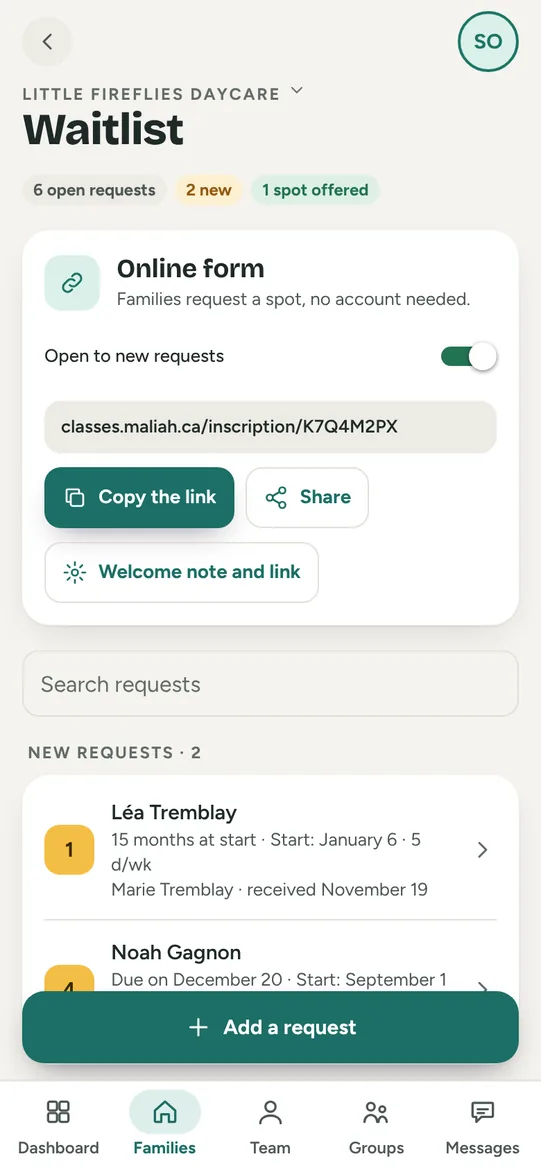
Your daycare gets its own online registration form. Each request lands in the waitlist, in order, and an offered spot becomes an enrollment in one tap.
Included in the plan, from $19 a month · 30-day free trial See pricing →


- Essentials free forever
- No ads
- Hosted in Canada
- iPhone · Android · tablet · web
- 10 languages
What it does
- A public form in your daycare’s name, shared by link or QR code on your website or social pages. Families request a spot without creating an account.
- Each family gets a confirmation email and can check the status of their request.
- The list in order, with desired start date, days per week, siblings, priorities and your notes.
- Offer a spot in a group, then enroll the child in one tap: they join the group.
- Requests taken by phone are added by hand to the same list, and a switch closes the form to new requests.
1 link
for the registration form
0 accounts
for families requesting a spot
1 tap
from offered spot to enrollment
Before and after
Before
- Emails and voicemails copied into a notebook.
- A spreadsheet list that is never up to date.
- The same phone call again: “where are we on the list?”
Maliah Classes
- Complete requests arrive on their own.
- The list in order, with priorities and your notes.
- Each family follows their request online.
How it works
- Open the waitlist and share your form’s link or QR code.
- Requests arrive in order; each family gets a confirmation.
- Offer a spot, then enroll the child in their group in one tap.
For everyone
The director
Shares the form, keeps the list in order, offers spots and enrolls children.
The educator
Sees newly enrolled children join their group, with their allergies.
The parent
Requests a spot online, gets a confirmation and checks the status of their request.
Frequently asked questions
Do parents need an account?
No. The form opens in any browser; the family gets a confirmation email and a link to follow their request.
Can we close registrations?
Yes. A switch closes the form to new requests; the list stays, and you can still add a request by hand.
How is the list ordered?
By rank: priority requests first, then by request date. You mark a sibling or a priority and add your notes on each request.
What happens when a spot opens?
You offer the spot in a group; when the family accepts, one tap enrolls the child in the group, and the family can follow their day in Maliah.
Other features
 Attendance and ratios
 Ratios by place
 Daily log
 Dictate the journal
 Daily report
 Portfolio and portrait
 Parent communication
 Groups and spots
 Enrolment and families
 Team and tablet
 Billing and payments
 Tax receipts
 Sign-in at the door
 Attendance sheet
 Schedules and time clock
 Incidents, emergency and medication
 Special needs and autism
 Calendar and menu
Free to start
Try it with your team tomorrow morning
The essentials are free for the whole team, and the plan has a 30-day free trial, on phone, tablet and computer.