EN
Maliah

Baby & pregnancy tracker for the whole family Say it, it’s logged.

The baby tracker app the whole family shares, from pregnancy to childhood. Feeds, diapers, sleep, health, pregnancy, documents, calendar and family messages: each child at their own stage, and the whole family follows along, each with their own account.

Create my family

Download on the App StoreGet it on Google Play

Scan to download With your phone’s camera, on iPhone or Android.

Demonstration: a parent says “Noah had 4 ounces on the right breast 20 minutes ago”, and the feed appears in Noah’s record with its time, its author Sophie, and an Undo button.

Each child at their own stage

A newborn is feeds and diapers. At 6 months, it’s first foods and allergens. At 4, it’s the calendar. Maliah shows each child only what matters at their age, and a pregnancy is a child on the way, with a record of its own.

Pregnancy
Weeks and days, due date, birth plan, hospital bag, week-by-week reminders, and a section for the partner.
Newborn
Feeds (left breast, right breast, bottle), diapers, naps, next breast suggested.
Starting solids
Foods introduced, priority allergens, reactions.
Child
Calendar, activities, shared tasks.
Every entry, your way
A note and a title on any entry, nursing and naps timed to the second, weight and height in kg or lb, cm or in.
A routine, ready for the sitter
Maliah suggests each child’s typical day from what the family logs, fills the gaps for their age, and you share it with the sitter in one tap.
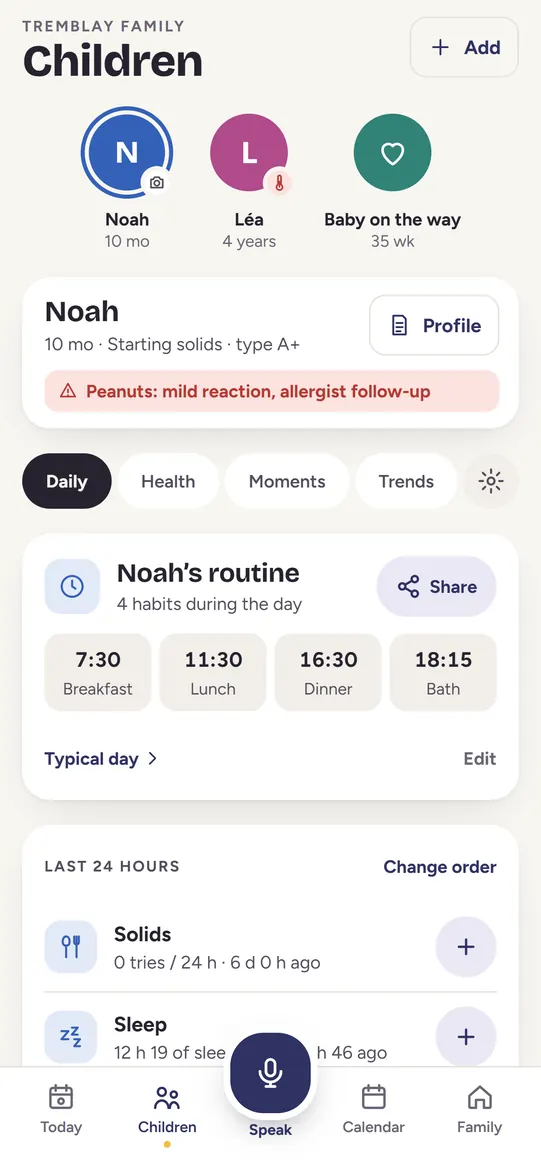
Children screen: Noah, 10 months, Léa, 4 years, and a baby on the way at 35 weeks, each at their own stage, then Noah’s routine ready to share with the sitter.

Talk, hands free

A baby in your arms, the phone out of reach: tell Maliah what happened. It’s logged with the time and your name, and you can undo it.

  • Everything you can do by handLog, fix or delete an entry, move an appointment or a task, add a note. “Remind me in 1 hour” works too.
  • It keeps listeningOn your phone, the conversation goes on when you switch apps or lock the screen.
  • One press to talk“Talk to Maliah” from the iPhone Action button or Control Center, or from the Android quick settings tile.
  • Siri, on iPhone“Hey Siri, last feed in Maliah”, “Tomorrow in Maliah”: the answer without opening the app.
  • Apple Watch, widgets and the lock screenOn the Apple Watch, log a feed, a diaper or a sleep in one tap. On iPhone, a “Last feed” widget, and a Live Activity for a nursing session or a sleep in progress, on the lock screen and in the Dynamic Island.
  • No medical adviceThe assistant reads what you logged or what a document says. It never calculates a dose.

Pregnancy & labour day

A pregnancy is a child on the way, with a record of its own. Week by week until the due date, then on the big day, Maliah keeps what you decided at hand.

Week by week
Weeks and days, the due date, reminders for each week, the hospital bag and the paperwork, at your own pace.
A birth plan to show the team
Fill it in at home, then show it full screen when you arrive, or print it.
The contractions timer
One big button: start when it rises, stop when it eases. Duration and interval, without deciding anything for you.
Kept after the birth
“Baby is here” erases nothing: the birth plan, contractions, appointments and notes stay in the child’s record. The birth is announced to the whole family in Messages, with a celebration.
The partner’s view
Your partner sees what you expect from them, the positions to practise and how to help on the big day, in their own account.
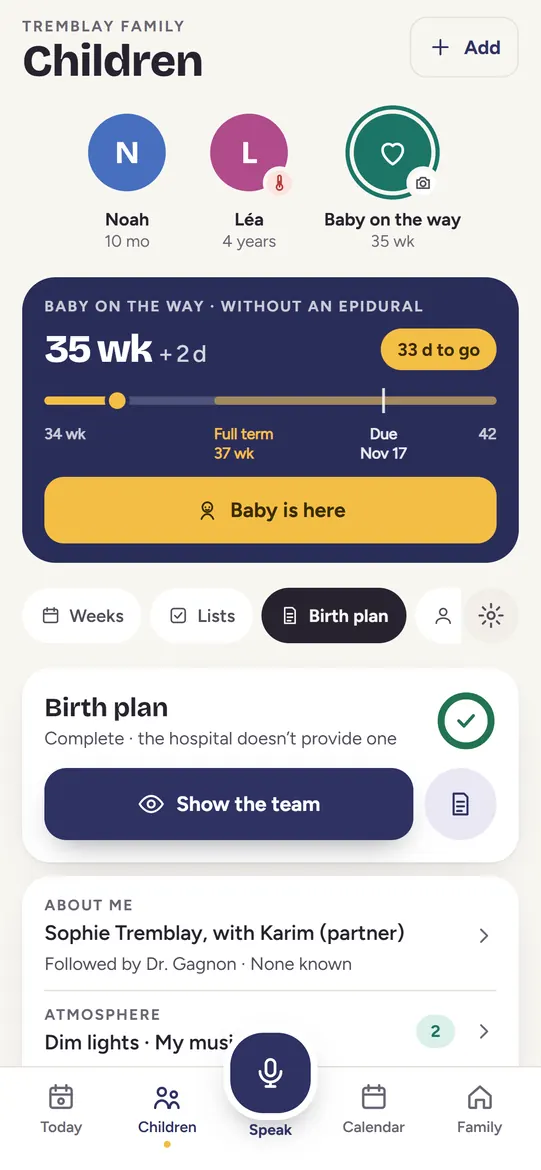
Children screen: the baby on the way at 35 weeks and 2 days, due November 17, then the completed birth plan with the Show the team button.

The whole family, each with their own account

Both parents, the grandmother who babysits on Tuesdays, the Friday-night sitter: everyone has their own account, in their own language, and sees exactly what you chose.

One account per person
No shared passwords. Every entry keeps its author and its time: you know who gave the 6:50 p.m. bottle.
Access chosen before the invitation
Start from a ready profile (Parent, Close family, Sitter mode, Read only), then adjust each area: No, View, or View and edit. For which children, the pregnancy included.
For as long as you want
Always, until a date, or only while Sitter mode is on. Allergies, emergency contacts and the medication schedule always stay visible to whoever looks after the child.
Grandparents and the sitter
Invite them with a link that lasts 7 days, in their language, with a plain summary of what they’ll be able to do. They log what they do, you see it as it happens.
The babysitting sheet
During a babysitting, the sitter sees what comes next (bottle, nap, your instructions) and gets a reminder 10 minutes before. They tap “I’m here” and “I’m leaving”, can hand over to someone else, and you get a recap at the end.
One family, several families
One person can belong to several families: mother here, aunt or sitter there. Switch with one tap.
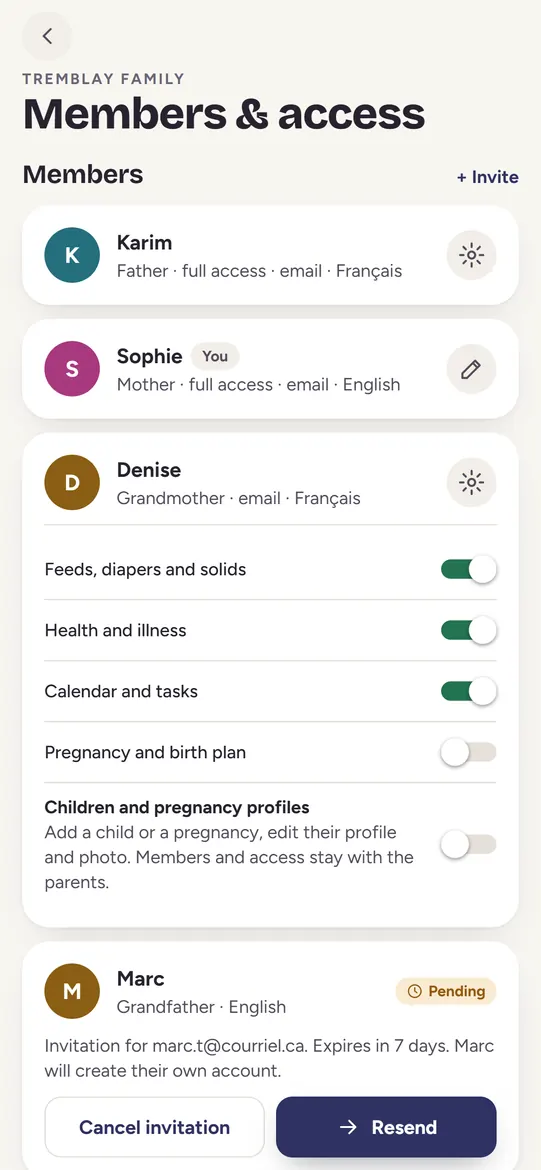
Members & access screen: Karim, Sophie and Denise, the access switches set for the grandmother, and the invitation sent to Marc.

Health, without ever replacing the doctor

A fever is three days of small notes scattered across two phones. Maliah keeps them together, in one place.

The temperature curve
With the 38 °C mark, reading after reading, by whom and at what time.
Medicines given
What, how much, when, and by whom. So nothing is given twice.
Vaccines, dose by dose
The vaccination schedule by age, to tick off: a vaccine that comes back at 2, 4 and 12 months shows its dose number. A fact you log, never a medical reminder.
A summary ready for the doctor
The current episode, night wakings, temperatures and medicines, ready to show at the appointment.

Maliah does not replace a health professional: the app never calculates a dose and gives no medical advice.

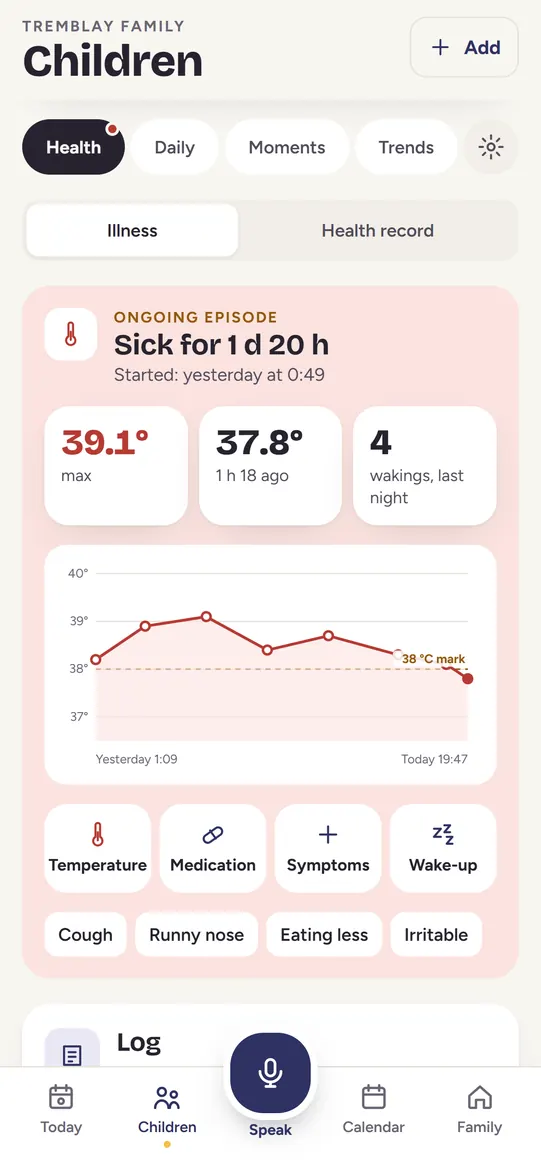
Léa’s Health section: an ongoing episode for 1 day 20 hours, the 39.1 degree peak, the latest at 37.8 and the curve with the 38 degree mark.

Every paper, in one place

The vaccination record, a prescription, results, the daycare form, the health insurance card, the ultrasounds: each child’s papers and the pregnancy’s, found in seconds.

  • A clean photo, straight awayTake a picture or add a PDF: the page is cropped and straightened automatically, on your device. Preview any document on screen, then print it or save it as a PDF.
  • Search that reads insideType “SIN” and the social insurance card comes up. The text is read on your device; no AI ever sees the image.
  • Private, shared only on purposeOnly members you gave that access to see them: health, daycare and school, identity and insurance, pregnancy.
  • Ask out loud“What’s the number on Léa’s health card?” The assistant finds the document and reads what’s written, without interpreting it.

The calendar that warns you about conflicts

The pediatrician at 10:30 and the prenatal class at 10, the same day? Maliah sees it before you do.

Your own calendars, alongside
Connect your Google account, your phone’s calendars or an iCloud or Outlook link. Maliah reads them to check for a conflict and never shows them to the rest of the family.
The warning, before you save
Two things at the same time for the same person? The app says so, names what is already planned, and suggests the next free time.
The assistant asks first
“Add Léa’s vaccine Monday at 10.” If there is a conflict, the assistant says so and waits for your yes before adding anything.
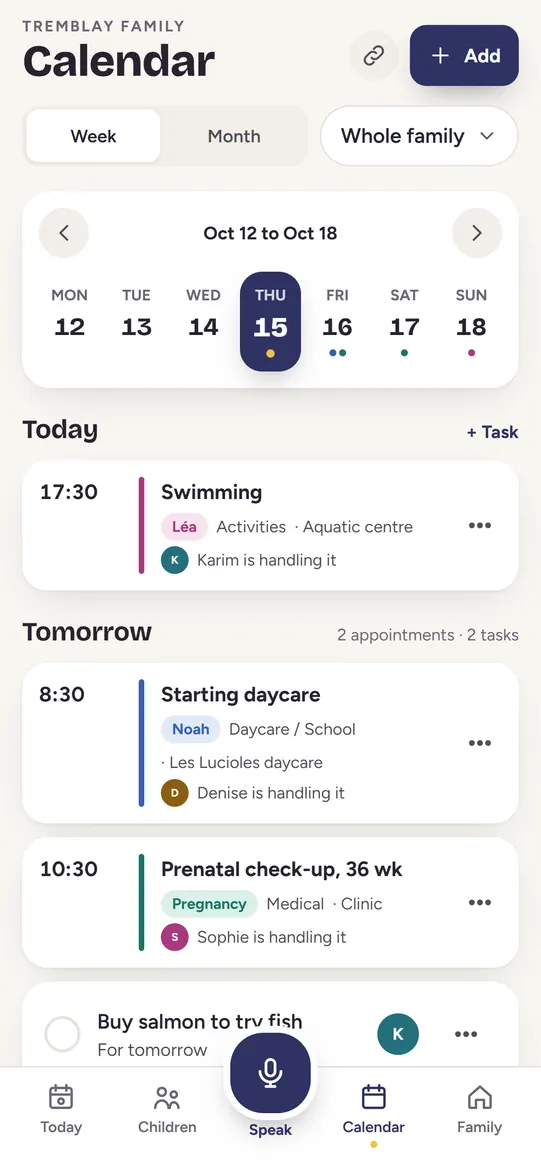
Family calendar: the week of October 12 to 18, today’s and tomorrow’s appointments, each with the person taking care of it.

The family, together

Beyond the logs: the family talks, celebrates and sees its week, in the same app, each in their own language.

Family messages
A conversation for the whole family, one-to-one chats for babysitting, and groups. Private photos, voice messages, emoji reactions (double-tap a photo to heart it), and a message can be about a child; the thank-you after a babysitting opens its recap.
Birthdays
On the day, a card on Today, wishes from the family, and a celebration screen with Maliah’s voice, after a tap.
Your week as a family
Every Sunday evening: each child’s week, who did the nights, and a thank-you to the ones who helped.
Your parent badges
Everyone earns badges with what they already log: first week, 100 entries, night shifts, hands-free by voice… and a day streak. An email tells you about a new badge if you said yes to emails, never more than one a day.
Your first steps
Four small missions on Today to learn the essentials in about a minute. Then the card goes away.
Today, at a glance
The whole family’s tasks for the day, overdue ones included, in a card that folds away. At the top, Documents and one inbox: Messages and Notifications.
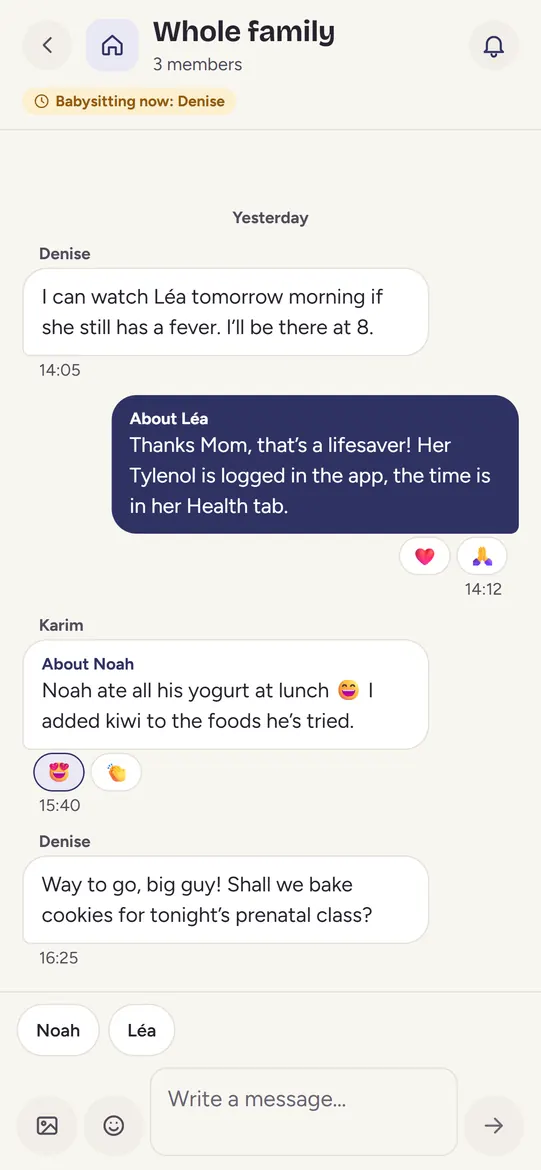
Family messages: Denise offers to watch Léa, Sophie thanks her about Léa, with a heart and folded hands as reactions, then Karim tells about Noah’s lunch.

The Village: the ones who follow from afar

Grandparents, godparents and friends see the moments you choose to share, never the journal. And parents meet other parents, with the same questions, in clubs.

The Circle
Invite the people who love your children without making them family members. They follow the shared moments, send hugs and notes, free of charge.
Moments, proposed, never posted on their own
A first food, a record night, a streak of story time, a new month: Maliah spots it in the journal and offers it. A parent decides, adds up to four photos, and can share it as a story. Nothing about health.
Parent clubs and monthly challenges
Same birth month, same city, same topics. Clubs open only when every parent in the family says yes; every post is checked before it appears. Monthly challenges match each child’s age and fill in from the journal; each badge has its own colour and turns bronze, silver, then gold. The family levels up, and parents who choose to can appear on the weekly podium of their club, follow one another and pick what their profile shows, with a preview. In each club, parents propose meetups in public places (a park, a library, a café, never a home), added to the calendar in one tap. And a family that starts with your link gets a month of Maliah Plus; yours does too, once.
The first-year book
A magazine to print at home: the shared moments and their photos, milestones, first tastes, growth, the longest night and the Circle’s notes. The preview is free; the book is part of Maliah Plus. And in the Shop: the book printed and delivered, a wall calendar, a mug, a poster, a canvas, a bodysuit, cards or a Christmas ornament, made with your photos.
Your daycare, inside Maliah
On invitation: when your daycare uses Maliah Classes, its own app, it invites you from there and sends you a link or a code. Once your child is linked, the group’s feed and photos, the day’s report hour by hour, your child’s progress, messages with the team and absences to report all arrive in Maliah. Two children can go to two daycares; when one leaves, their years stay there to look back on. Nothing from your home journal goes the other way.
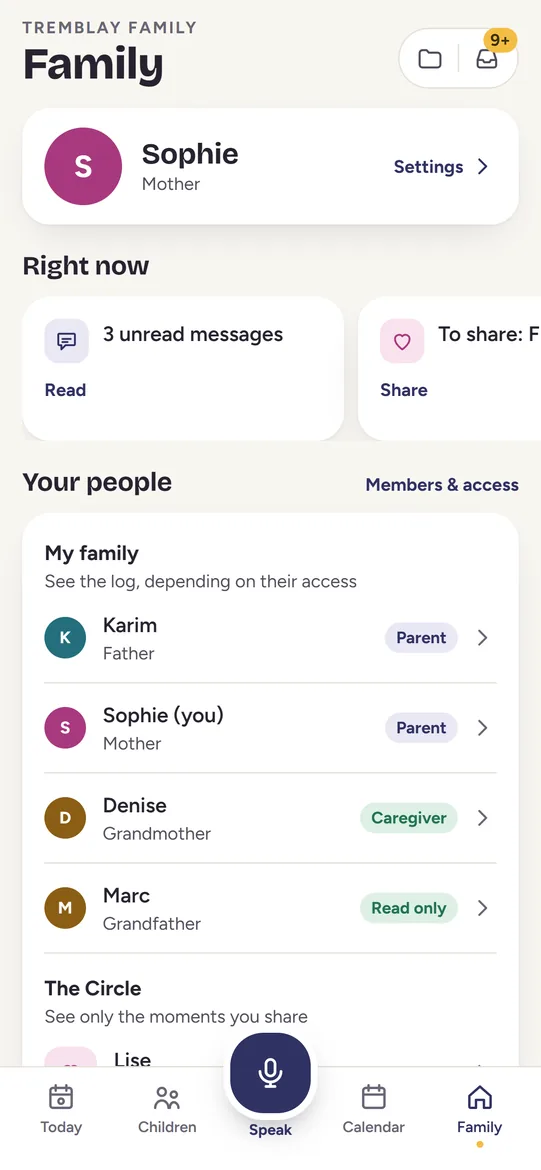
Family tab: “Right now” with unread messages and a moment to share, then “Your people”: the family with each member’s access level, and the Circle with Lise following the children.

Your data, protected

What your family writes down about its children belongs to your family. Here is what that means, concretely.

  • Hosted in CanadaOn servers in Canada, encrypted in transit and at rest.
  • Privacy laws, wherever you liveThe privacy policy is written to comply with Quebec’s Law 25, PIPEDA, the GDPR and the privacy laws that apply where your family lives. It says what is kept, where and why.
  • One account per personNobody shares a password. Every entry keeps its author.
  • Two-factor authentication, Face ID or fingerprintA code at sign-in if you want one; unlock with Face ID on iPhone or your fingerprint on Android.
  • Exportable and deletable, at any timeA readable file of the whole family, whenever you want. Deletion is final and immediate.
  • No ads in the appMaliah sells no information. One measurement tool, in the iPhone and Android apps only: the Meta SDK, which counts the installs that come from our ads (install, open, subscription purchase), with no advertising ID and nothing about the family, the children or health. The web app has none.

Essentials or Plus

Every new family gets 7 days of Maliah Plus, with no card. After that, Essentials stays free forever: nothing is erased.

Maliah Essentials

For following the day, together.

Freeforever

  • Feeds, diapers, sleep, foods, journal
  • Unlimited children and members, access per person
  • Several families per person
  • Shared calendar and tasks
  • Each child’s documents, with search inside the text, preview and PDF
  • Family messages with photos and voice messages, birthdays and the weekly recap
  • Suggested routine, trends, parent badges and streaks
  • Siri, Apple Watch and widgets on iPhone
  • Pregnancy: weeks, reminders, contractions timer
  • Vaccines dose by dose
  • The Village: the Circle, clubs, monthly challenges, the book preview
  • Daycare (Maliah Classes), by invitation
  • Written assistant, 10 exchanges a month
  • Data export, always
Create my family

Maliah Plus

For the voice, health and pregnancy.

$7.99per month

or $79.99 a year, two months free

  • Everything in Essentials
  • Live voice assistant, 45 minutes a month; written without limit
  • Health: temperature curve, summary for the doctor, access log
  • A child summary written by Maliah
  • Pregnancy: fill in the birth plan, hospital bag and partner section; labour preparation and the “Good to know” guide
  • The Village: the first-year book, private clubs, the image of the week
  • Reminders and notifications on your phone, including new messages and the weekly recap
  • Share the weekly recap
  • Shared routine link for the sitter or daycare
Try it for 7 days

Paid by one parent, for the whole family. Same prices on iPhone, Android and the web.

Questions

Something else? Write to help@maliah.ca. We answer in French, English or Spanish, usually the same day.

Does Maliah give medical advice?

No. Maliah keeps what you write down (temperatures, medicines given, night wakings) and presents it clearly, to you and to the doctor. The app never calculates a dose and gives no medical advice. In doubt, call Info-Santé (811) or your doctor.

Who sees what in the family?

What you decide, before the invitation is sent. Pick a profile (Parent, Close family, Sitter mode, Read only), adjust each area (No, View, View and edit), choose the children and how long: always, until a date, or only in Sitter mode. Allergies, emergency contacts and the medication schedule stay visible to whoever looks after the child. The rules are enforced by the server, not just by the screen, and parents can see who viewed a health record.

What does the voice assistant do with my voice?

Your sentence and the context needed to understand it (first names, latest entries, calendar) are sent to OpenAI for the duration of the answer. Maliah keeps neither the audio nor the transcript. The entry it creates stays in your family, marked as added by voice, and you can undo it with one tap. A document’s text is sent only when you ask about that document; its image, never.

Does it work without the assistant?

Yes, entirely. Every feed, diaper, nap or appointment takes two taps to log. The assistant is a shortcut, not a requirement. With Essentials you get 10 written exchanges a month; with Plus, live voice.

Who sees the moments shared with the Circle?

Only the people you invited to the Circle, and your family members. They see the moment, its photos and its caption, nothing else: never the journal, health or documents. A moment is proposed by Maliah but published only when a parent taps Share, and a parent can withdraw it at any time. Clubs see even less: only what a parent posts there, with the child’s first name and age in months.

How do we export or delete our data?

Family → Reports & sharing → Export the family’s data (a readable file). To delete: Family → Settings → Privacy and data → Delete the family and all its data; for your account only, Settings → My profile → Leave the family or Delete my account. Available at any time, paid plan or not.

iPhone, Android or web?

All three, with the same account. On iPhone, Maliah is on the App Store. On the web, open app.maliah.ca and add it to your home screen. On a computer or a tablet, the app uses the whole screen, with your families in the left menu. On Android, Maliah is on Google Play.